


Some of the findings that inspired this article have their beginnings in discussions and research together with my colleague Risto Nikula. Thanks Risto! 👍
Jan 18th 2025: Fixed some outdated terminology – the article now talks about Purview Message Encryption instead of Office Message Encryption (OME). Thanks Zak Hepler for the tip.
Introduction
Working with files and email that have Microsoft Purview Information Protection sensitivity labels within a single tenant is familiar fare for many admins.
More interesting (and less obvious) is what happens when you transfer sensitivity labeled files or send labeled email from one Microsoft 365 tenant to the other and back, or to non-Microsoft recipients. In this article, I’ll tackle questions like:
- Do documents and email really only have one sensitivity label at a time?
- How is sensitivity label metadata stored with files and email?
- What components of the sensitivity label’s effects travel between tenants and affect user experiences in the external tenant?
- What are the implications of all this?
Why am I writing this instead of getting some fresh air?Just kidding. Let’s get on with it.
To preface this article, I assume you’ve turned on the Co-authoring for files with sensitivity labels tenant-level setting, shown in the image below.
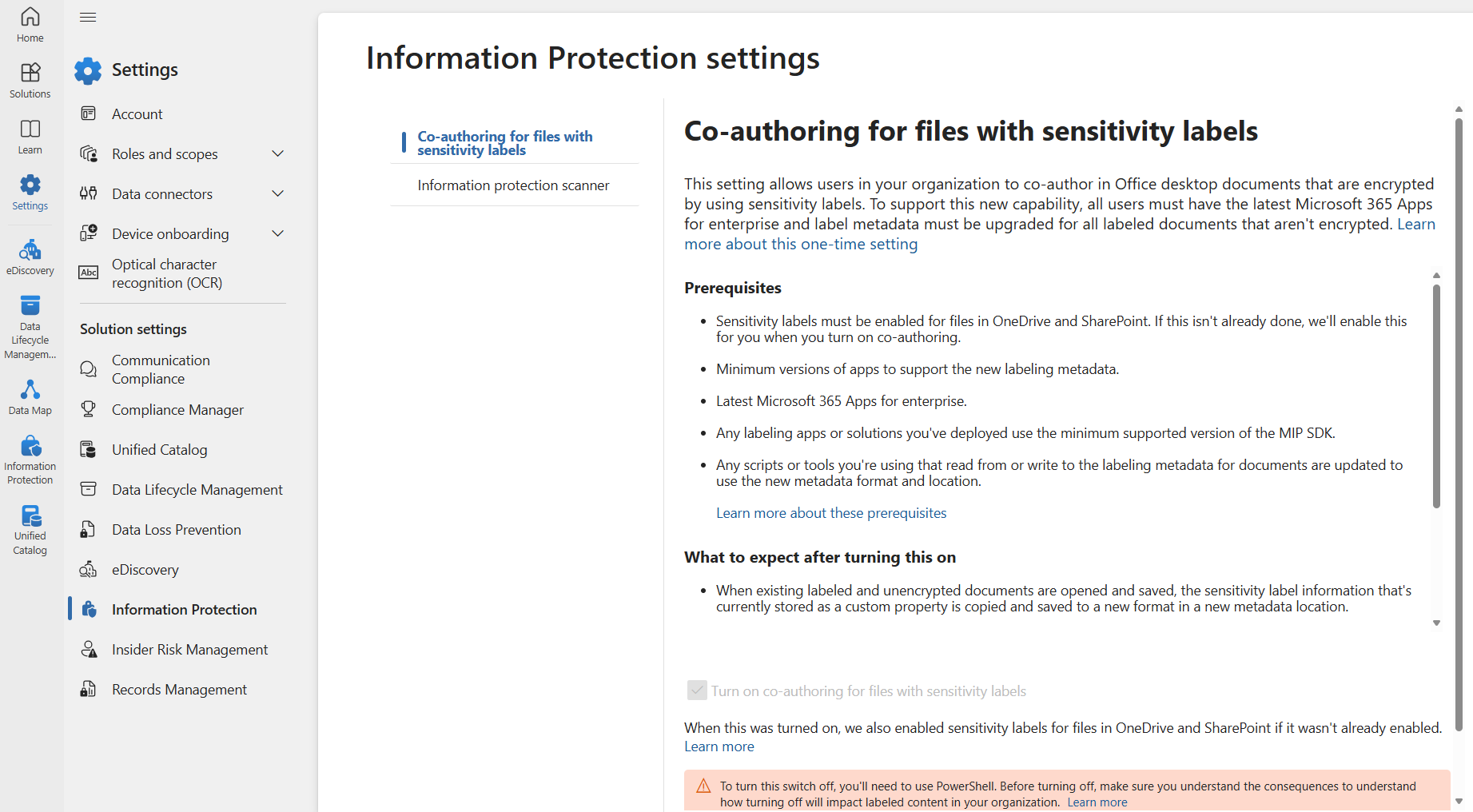
Enabling this no-brainer foundational setting changes the way some of the key information about a document’s sensitivity label is stored. You can read more about this change here.
Thus, most of what I say in this article is relevant to the new metadata storage solution.
Digging in
Why would we even be interested in knowing how sensitivity label metadata is stored with a file? Here’s the thing – understanding this apparently niche piece of information helps us grasp the behavior of sensitivity labeled content in some new, important ways.
On label metadata
To start us off, let’s get familiar with how sensitivity label metadata is stored in documents and email.
📃 Documents
This might be news to some of you, but the .DOCX, .XLSX and .PPTX files created by Microsoft 365 Apps are actually containers for a bunch of different .XML and other files that make up the full document.
To demonstrate this, let’s create a new .DOCX file and apply a sensitivity label to it.

Get the file on your local drive and you can grab an app like 7zip to peek inside and see the contents.

A typical sensitivity labeled .DOCX file holds folders like the ones below.

When we poke into the docMetadata folder, we’ll see a file called LabelInfo.xml. This is the file storing the file’s sensitivity label information.

Looking into the XML file, you’ll see the labelList attribute. This is your first clue to something you might not know about how sensitivity labels really work.

The labelList attribute has a couple of parameters that are of primary interest to us:
- label id: The guid of a sensitivity label applied to the document.
- siteId: The tenant ID the sensitivity label (not the file!) belongs to.
- method: Privileged means the label was applied manually, while a value of Standard implied it was applied by default or auto-labeling.
Most of the schema used in the LabelInfo.xml file is documented if you know where to look. I’ll save you time – it’s explained in the MIP SDK documentation here.
When you send a sensitivity labeled email from Outlook, the details about the label get stored in the message headers, in the msip_labels header.
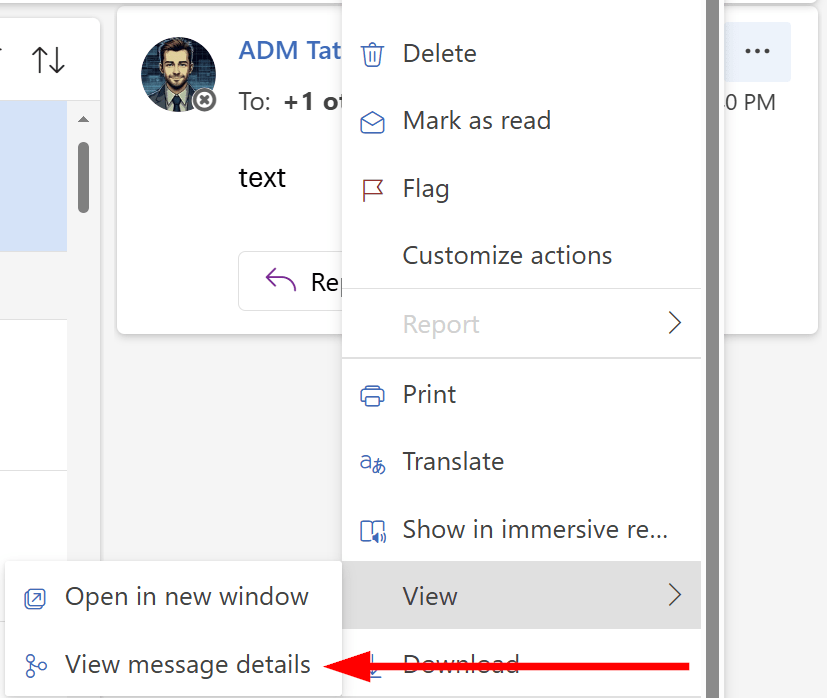
To take a look at the headers for yourself, open Outlook and send yourself a labeled email. Then, (in Outlook Web) open the (…) menu next to the message and select View -> View message details.
This will bring out a new window with the message headers. Copy them to the clipboard, open up the Message Header Analyzer and paste in the headers you copied. Click on Analyze headers to get an easily-readable report.
Scroll down to Other headers and you’ll soon find msip_labels with information that, despite superficially looking different to the information in LabelInfo.xml, actually follows more or less the same syntax defined in MIP SDK documentation.
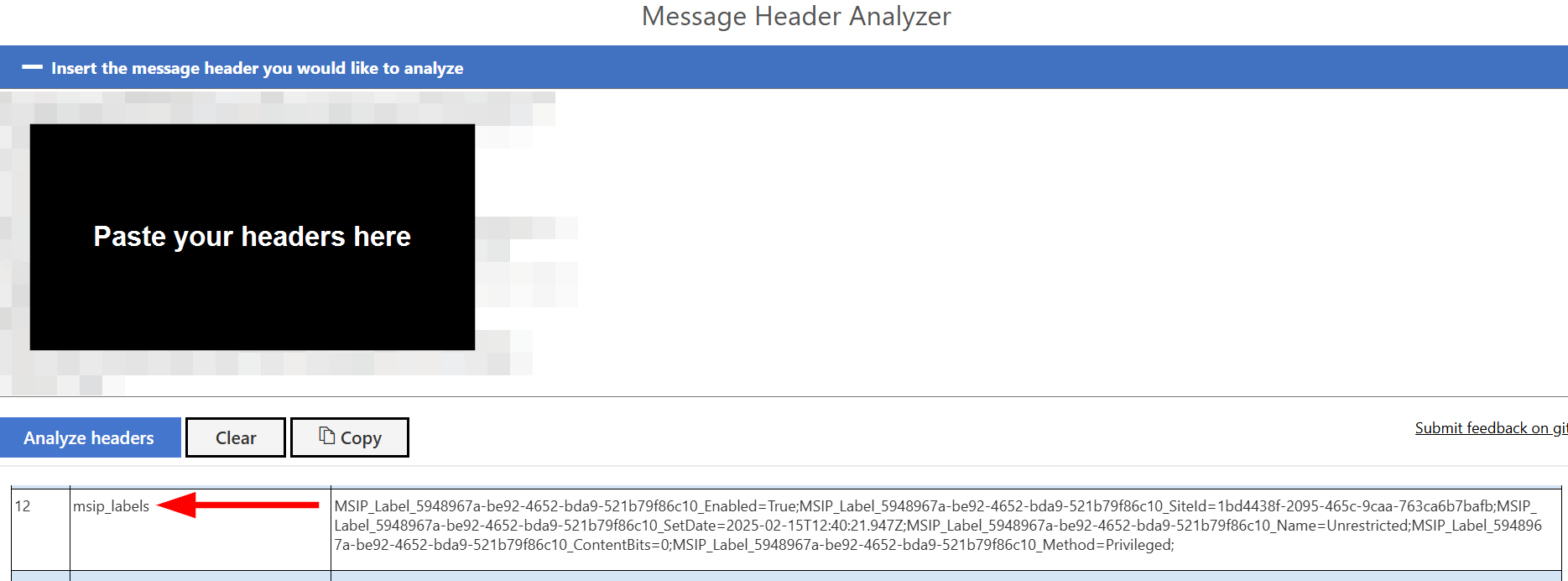
In the msip_labels header, you have the basics like the tenant ID to which the applied label belongs and info on whether it was manually or automatically applied.
In the label metadata for email, the label’s guid is inserted into each attribute describing the label in the header. Instead of simply having the attribute written as Method=”Privileged” as in LabelInfo.xml, the email header has the attribute MSIP_Label_<guid>_Method=Privileged instead.
How metadata travels across tenants (+ implications)
Understanding the way metadata is stored helps us better grasp the next part: what happens when sensitivity labeled files and email start getting passed around across different tenants, with various organizations applying their sensitivity labels as well.
📃 Documents
To demonstrate how labeled documents behave across tenants, I transferred the demo document to a second tenant. If you’ve ever done this yourself, you’ll have noticed that Office apps do not “see” the sensitivity labels on documents applied by other organizations in their tenants. Encryption and visual markings are still in effect even in the external tenant.
If a tenant has mandatory labeling in use (warmly recommended) and a user opens an unencrypted labeled Office file from an another tenant, they’ll be prompted to apply a label to the document.
I don’t blame anyone for thinking a file can only have one sensitivity label at a time – in fact, Microsoft even says so in documentation:
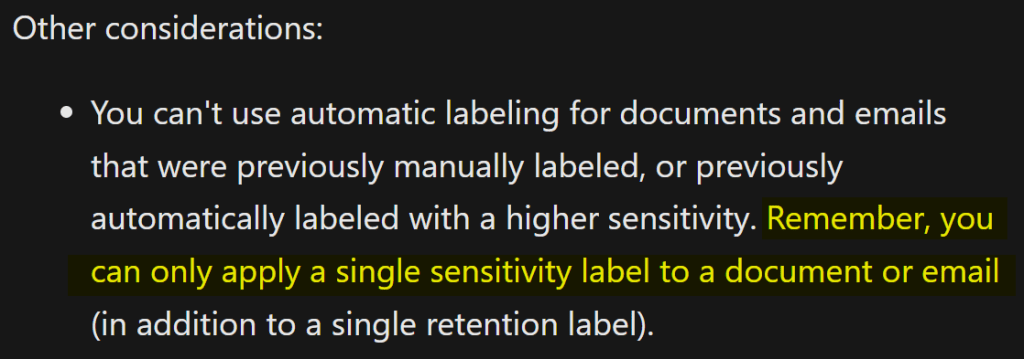
This is both true – and not true. You can only apply a single sensitivity label to a document or email – per tenant. You can have a whole array of labels applied at a time, but only one will be shown to the user – the one applied from the label taxonomy of the user’s tenant.
You can see this in the LabelInfo.xml of our demo document that I labeled in two consecutive, different tenants. I colored the label info to make the two entries easier to distinguish.

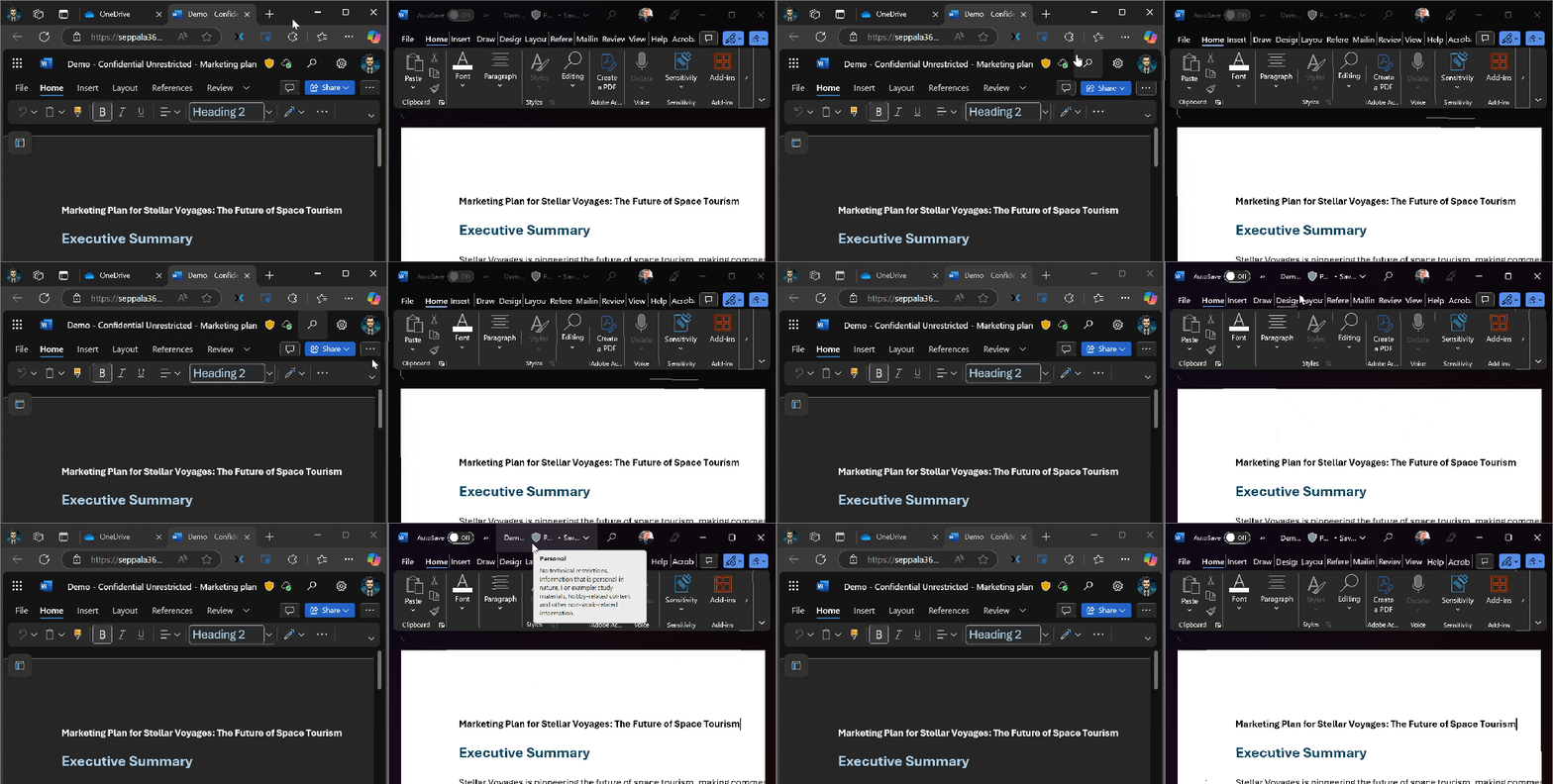
The user experience reflects this. Here is the exact same document viewed in two different tenants at the same time. Both tenants have applied their own label to the document and see that label – without seeing the other tenant’s label.

To reiterate the important points
- Visual markings (header, footer, watermark) do travel across organizations
- Encryption naturally travels as well – that’s more or less why it’s there
- The sensitivity label from Tenant A stays in place even when the document transits to Tenant B and gets labeled again there
Sensitivity labeled email correspondence works very similarly to documents, with some important details.
There are two main scenarios here to consider:
- Email correspondence between Microsoft email accounts
- Email correspondence between a Microsoft email account and a non-MS recipient
Microsoft email <-> Microsoft email
I’ll use an example to explain this:
- User 1 from Tenant A sends an email labeled as Confidential to User 2 in Tenant B.
- The label information gets stored in the msip_labels header tagged as Tenant A’s label specifically.
- For the recipient (User 2 in Tenant B), the email shows no preset sensitivity label. Since Tenant B requires all email sent through Outlook to have a sensitivity label, User 2 is prompted to label their reply email. What happens now?
Yep, information on the email label from both tenants is added to the msip_label header. I formatted an example of the header from such a scenario in a more easily readable format below that shows this behavior clearly below.

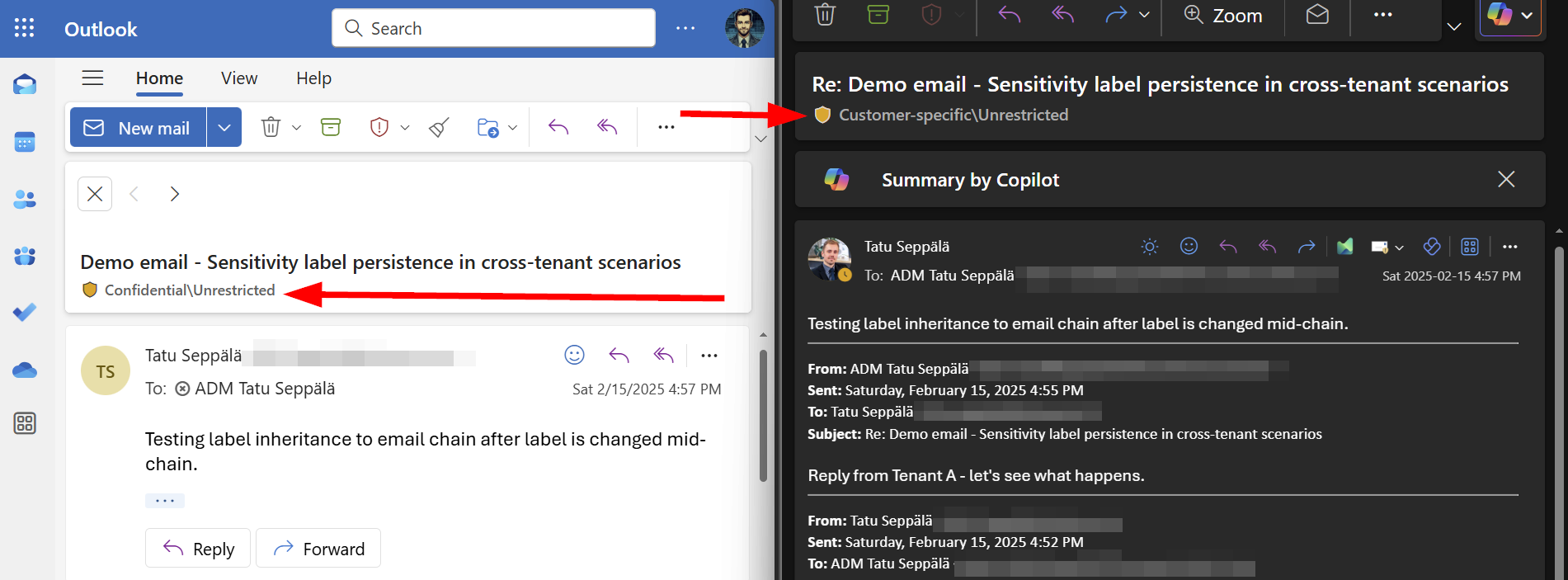
It also plays out in the GUI of both participants the same way. Once participants have labeled their email in the chain once, replying again inherits their tenant’s latest applied label from the msip_labels header.
Unencrypted Microsoft email <-> Other provider email
When the recipient uses an account from a different provider and the labeled email is sent without Purview Message Encryption, things can change and sensitivity label metadata persistence can break.
For example, when you reply to a sensitivity labeled email from a Gmail account, Google drops some of the headers from the message. One of the headers dropped is msip_labels, which inconveniently breaks Outlook’s ability to “remember” the earlier sensitivity label you applied in the chain – since it can no longer read this information from the incoming email header.
This is why, if your organization has mandatory email labeling enforced, you’ll have to reapply a sensitivity label every time you reply to an email from a Gmail / Google account during correspondence.
I would think at least some of the other providers do the same kind of messing with headers – but I haven’t done exhaustive testing on this.
Purview Message Encryption encrypted Microsoft email <-> Other provider email
Some organizations might be smart and use sensitivity labels to easily apply Purview Message Encryption to email messages. Instead of the actual readable email, non-Microsoft recipients will get an email directing them to access the encrypted email through a dedicated portal. Thus, any replies will not actually come through Google’s email services but rather from within Microsoft infrastructure.

This has the nice effect of preserving the msip_labels header and thus the sensitivity label persists through the correspondence when replying even though the recipient is outside of the MS ecosystem.

Yes, this is merely a nice tiny side benefit to using Purview Message Encryption for emails, but we’ll take it. 😉
TL;DR
To pull together the key points:
- Both Office files (DOCX, XLSX, PPTX) and Exchange Online email can have more than one sensitivity label – but they can only have one sensitivity label at a time per tenant.
- Office files are actually pseudo-archives that store sensitivity label metadata in a file called LabelInfo.xml within them.
- Email stores sensitivity label metadata in the message header msip_labels which persists across email chains between Microsoft email accounts, but might get dropped from replies to correspondence sent by other email providers – and definitely are dropped at least from replies sent by Gmail accounts..
- ..unless you use Purview Message Encryption, in which case email conversations with non-MS recipients also retain sensitivity label metadata because all interactions happen in the Purview Message Encryption portal – within Microsoft’s infrastructure.
Once again, it feels like it’s pretty much always worth it to be curious and dig deeper. There’s always more to learn!
 Seppala365.cloud
9 responses to “Purview under the hood: the cross-tenant quirks of sensitivity labeled content”
Great article – curious to how this works in a GCCH environment, sending from Microsoft GCCH tenant to Microsoft Tenant or Microsoft GCCH tenant>non-MS tenant
Struggled to get answers from Microsoft!
LikeLiked by 1 person
Thanks. Would be interesting to know, yeah. 🙂
LikeLike
Thank you for the article!
What happens if you send a labeled e-mail to another MS-Tenant that doesn’t use Labels?
You said they’ll be prompted to select a label, but if they don’t have any?
LikeLike
Thanks for the good question. If the other tenant isn’t using sensitivity labels, they won’t get prompted to select one. Basically, one tenant cannot mandate an another one to label their content.
LikeLike
Love the info!
Do you know by any change how the marking can be activated when you apply the label by an outside the client mechanism, such as the MIP client or the sharepoint file browser? We noticed that the marking that is used in tenant A is visible for tenant B, although we would like that to be invisible in tenant B (but visible in tenant A).
LikeLike
Thanks! The Microsoft Information Protection sensitivity label visual marking system adds the text into the document itself, which is why it’s not tenant-bound. For example, in Word, it’s actual (user-removable) text. Outside of custom code, I don’t know of current native mechanisms to make visual markings tenant-bound. You could look into dynamic watermarking though, it might help in some scenarios: https://seppala365.cloud/2024/08/13/a-closer-look-dynamic-watermarking-through-sensitivity-labels/
LikeLike
Great Article !!!
What about the permissions, if the Tenant A applied label with encryption (blocking print, copy / extract content) what will happen at Tenant B when they apply least restrictive labels or label with no encryption.
I am hoping the IRM permissions will be retained from tenant A ?
This leads to another question, what happen if Tenant B apply encrypted label with different set of permissions and try to send it to Tenant C . Which IRM permissions will be applied. I am still hoping from Tenant A
Thanks
LikeLike
If a document is encrypted, you won’t be able to remove and replace the encryption without “Change rights” permissions – which practically means Full Access (Co-owner) permissions in encryption settings. Tenant A encryption stays applied in your case regardless of where the document travels.
LikeLike
Great Article !!!
What about the permissions, if the Tenant A applied label with encryption (blocking print, copy / extract content) what will happen at Tenant B when they apply least restrictive labels or label with no encryption.
I am hoping the IRM permissions will be retained from tenant A ?
This leads to another question, what happen if Tenant B apply encrypted label with different set of permissions and try to send it to Tenant C . Which IRM permissions will be applied. I am still hoping from Tenant A
Thanks
LikeLike