



Index of parts:
- Part 1: Identify your data
- Part 2: Getting started with sensitivity labels
- Part 3: Implementing automatic sensitivity labeling & outlining a labeling strategy
- Part 4: Information governance & automatic sensitivity-based retention labeling
- Part 5: Data Loss Prevention
Collaboration in the cloud is awesome. On the other hand, protecting sensitive data while ensuring compliance in a Microsoft 365 environment is both critical and definitely not a piece of cake.
The adoption of mechanisms for the protection for identities in the cloud seem to be creeping closer to a decent level of maturity by now – especially with the global shift during 2020-21 giving so much more gravity to using cloud services like Microsoft 365 for wide-scale remote work. Strong and robust identity protections are something organizations relying on Azure AD hopefully have in place at this point.
Something that might not be quite as developed for many organizations is the level of information protection and governance over their data in cloud services. And data, it seems, is typically what most security measures boil down to in the end – either directly or indirectly.
Since I think this topic is one of the most important ones going forward to 2022, I wanted to explore a somewhat plausible end-to-end scenario – essentially to discover how to first identify confidential business data, then implement sensitivity-based protections along with retention controls and finally ensure some form of data loss prevention is in place to prevent accidental disclosure. It turns out there’s a lot to unpack here so I will look to split this one into several parts to maintain brevity.
The usual disclaimer: None of what we’re about to look at here is likely 100% applicable in a production scenario. This is an exploration of technology and concepts to get a general idea of possibilities and methods. Always work with a specialist when implementing information protection and governance controls in a production environment.
With that out of the way, let’s get going!
Part one – Identify your data 🔎
You can’t protect what you don’t know about.
The first step to securing data in the cloud is understanding what kinds of sensitive data you have in the cloud, how much of it you have and where it resides. We have a couple of useful tools to help with this in the Microsoft 365 suite. First, let’s look at sensitive info types.
Sensitive information types (SITs)
A sensitive information type or SIT is basically a recipe for identifying sensitive data based on patterns. They can be primarily based on RegEx, a keyword list, a keyword dictionary or a pre-defined function.
This time I navigated to the Compliance portal (compliance.microsoft.com) portal and created a new custom sensitive info type with RegEx to identify IPv4 addresses in data and emails with a list of keywords such as “server” and “network” acting as supporting evidence. The idea here was that in a real setting, I would want to ensure that any documents containing details on the company’s internal network could be located and secured. Writing proper RegEx isn’t my forte (yet 😉) so I grabbed a pre-made expression from the web for use in this scenario. This stuff really isn’t easy on the eyes: \b(?:[0-9]{1,3}\.){3}[0-9]{1,3}\b
Sensitive info types can and usually should also be reinforced with supporting evidence such as keywords. The more supporting evidence is found for an instance of a detected piece of sensitive information, the higher the confidence level of a match. Microsoft provides a nice overview of the fundamental parts of SITs in Docs.

After creating my sensitive info type, I also whipped up an example Excel file (see adjacent image) containing some 100% fictitious network details that I would use throughout the scenario to test the solution.

It was time to test out the info type against some example data. This can be done by selecting Test when viewing the details of a custom sensitive info type you have created and then uploading an example file containing data that is expected to trigger a positive match. It is also good practice to prepare a file – or several – containing info similar to but not actually matching your desired sensitive information type to help make sure your detection method is accurate enough for your needs.
My test run was a success, as we can see from the high confidence matches in the image. Also take note of the detected supporting evidence, mentioned earlier.
Now that we have our basic building block in place for identifying a desired kind of data, let’s put it to use.
Defender for Cloud Apps file policies
The recently-renamed Microsoft Cloud App Security or MCAS is a very powerful Swiss army knife for information protection and governance along with many other scenarios. In this case, we’ll use it to build fine-grained visibility into files that contain our SIT.
I navigated to the DfCA portal at portal.cloudappsecurity.com and created a new File policy.
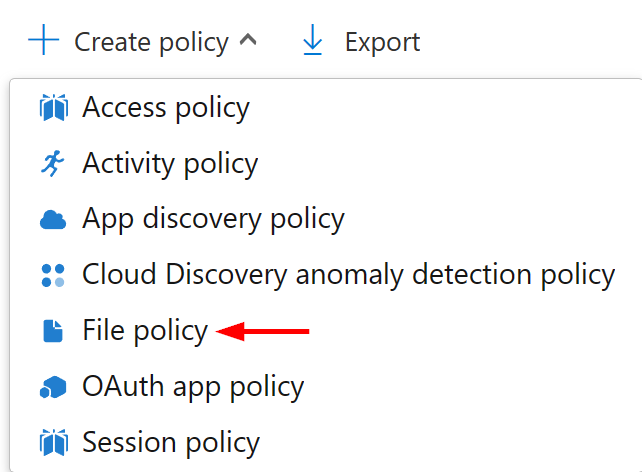
File policies can be used for active governance but work just as well as purely visibility-enhancing tools. We’ll call our policy Sensitive information detection: S365 IPv4 addresses and place it in the DLP (short for Data Loss Prevention) category.
For scope, we’ll direct the policy to scan files from relevant Microsoft 365 services, 15 in all. For inspection method, let’s use the Data Classification Service which will unlock our SIT for use in refining detections. We’ll also limit policy matches to data in which our SIT is present three times or more.

Finally, let’s integrate DfCA with Microsoft Information Protection so we can let our policy inspect MIP-protected files. This can be turned on from the DfCA portal’s Settings menu under Information Protection > Microsoft Information Protection. This same integration also enables our File policies to automatically apply sensitivity labels to matched files – as long as the file type supports sensitivity labeling, that is. While we’re at it, let’s make sure DfCA automatically starts scanning new files for MIP sensitivity labels to enable us to more easily track sensitive content across integrated cloud services.

With MIP integration enabled, we can now let our File policy inspect MIP-protected files as well.

As I mentioned, File policies can also be used flexibly for automatic governance. I’m planning to get further into that topic in a later part of this mini-series. The newly-created policy will take a while to scan for matches.
I stopped for a bit and let things brew for about 24h before checking for matches. Checking back the next day, there were indeed the expected matches from different services. ✔

We can look at each matched file with the View all matches option for a policy or by selecting Investigate > Files and then selecting the desired policy or policies.

Digging deeper, we can look at a bunch of details for each file, including the amount of external and internal collaborators the file is shared to. Also note that I already labeled this one as Confidential to see how sensitivity labels were detected by DfCA:

Finally, for each individual match, we have the option to take further manual action in a variety of ways:

Content explorer

Aside from DfCA, we can also use the Content explorer in the Compliance portal to get a different kind of view into sensitive data in our Exchange Online, SharePoint Online and OneDrive services.
For users with general permissions to the Compliance portal, Content explorer offers a service-level break down for the number of matches for each sensitive info type, sensitivity label and retention label. If you have the proper additional Security and Compliance center role (Content Explorer List Viewer) you can drill down deeper into the service-level reports. With the Content Explorer Content Viewer role you can actually look at the source content of each matched file as well.
Something to keep in mind though: Microsoft’s built-in sensitive info types often use RegEx-based matching so in any environment with lots of data in Microsoft 365 services you will likely see some false positives here for things like, for example, New Zealand driver license numbers.
Before we wrap things up, let’s look at some other ways that can help us build visibility in Microsoft 365 services.
Advanced sensitive information identification methods
Microsoft also provides other, more specialized alternatives for detecting sensitive data. For now, I’ll give a very high-level description of some of the more prominent ones:
- Document fingerprinting lets you take a standardized unfilled form or document that your company uses as part of business processes and create a “fingerprint” from it to enable detection of other filled versions of the same form.
- Exact data match based SITs use content from one of your own existing databases to identify sensitive information elsewhere. The advantage is that you can detect instances of data using exact values from your own source which should help cut down on false positives significantly and unlock scenarios otherwise inaccessible through the other methods.
- Named entities are the newest addition and as of December 2021, still in preview. They help you identify more difficult to define things such as medical terms and physical addresses. You can use them to identify all possible matches of a thing, such as all physical addresses – this is called a bundled entity. On the other hand, you can identify only addresses from a specific country, in which case we’re talking about an unbundled entity.
- Trainable classifiers forego the identification of specific patterns of sensitive data altogether and instead use built-in or self-trained custom machine learning models to match and classify the targeted data. This method works by exposing a classifier to hundreds of pieces of both good and bad examples of the desired type of content to identify new, previously unseen instances of such files in your cloud services. We could say that trainable classifiers don’t look at only certain properties of a file when determining a match but rather look at the file as a whole.
Parting thoughts
I usually try to avoid repetition, but I’ll make an exception here. You can’t protect what you don’t know about. Using the various tools in Microsoft 365 to full effect is fundamental to ensuring our ability to protect and govern business data in the cloud.
Next time, we’ll start labeling some critical data and implementing protections for it. Until then, have a good one and happy holidays! 🎄


4 responses to “Information protection & governance with Microsoft 365 #1: Identify your data”
[…] 2023 Security & Compliance Power Platform / Power BI, Purview / Information Protection ← Information protection & governance with Microsoft 365 #1: Identify your data → Information protection & governance with Microsoft 365 #3: Implementing automatic […]
LikeLike
[…] Part 1: Identify your data […]
LikeLike
[…] Part 1: Identify your data […]
LikeLike
[…] Part 1: Identify your data […]
LikeLike