


This article is part of a series discussing my experiences fine-tuning IRM policies. To start from the beginning, check out part 1.
Part 1
- The importance of accurate risk scoring
- Defining excluded, unallowed and 3rd party business domains
- Creation and use of detection groups to build indicator variants in place of or alongside built-in indicators
Part 2
- Choosing the relevant indicators for each scenario
- Regular fine-tuning passes for each policy’s indicator thresholds, based on analytics and other considerations
Part 3
- Creating policies based on priority user groups for high-value / high-risk roles & individuals
- Leveraging various risk score boosters
- Thoughtful use of priority content
- Use of cumulative exfiltration detection refined by peer groups through Entra ID enrichment & integration
- Configuring various types of global exclusions
- Undiscussed fine-tuning options
Choosing indicators

Previously, we discussed indicators – individual meaningful auditable events which provide Insider Risk Management with its investigation substrate. While there is an ever-increasing array of them available from a variety of sources, you might not always be better off using absolutely all of them.
The reasons for choosing to deactivate one or more indicators has, in my experience, at least several recognizable reasons behind it:
- Laws and regulation: Some countries have stricter regulations regarding specific types of technical monitoring than others. For example, using indicators related to emails and Teams messages might be challenging to utilize in countries with stringent communications secrecy laws.
- Relevancy: Some indicators might simply not be valuable data points for what you are trying to investigate with a given policy – especially for specialized policies targeted to narrow groups like VIPs – and thus can be better left unevaluated for a more focused approach. This can be especially true if you are creating policies that only trigger alerts for activity related to priority content – or ones that drive Adaptive Protection controls that affect user experiences.
- False positives: Like we figured out when discussing indicator variants, some built-in indicators are quite vague and spammy in widely targeted ‘baseline’ policies, and can even cause plenty of unhelpful signals if not properly fine-tuned. Dropping these in favor of more focused variants can be beneficial.
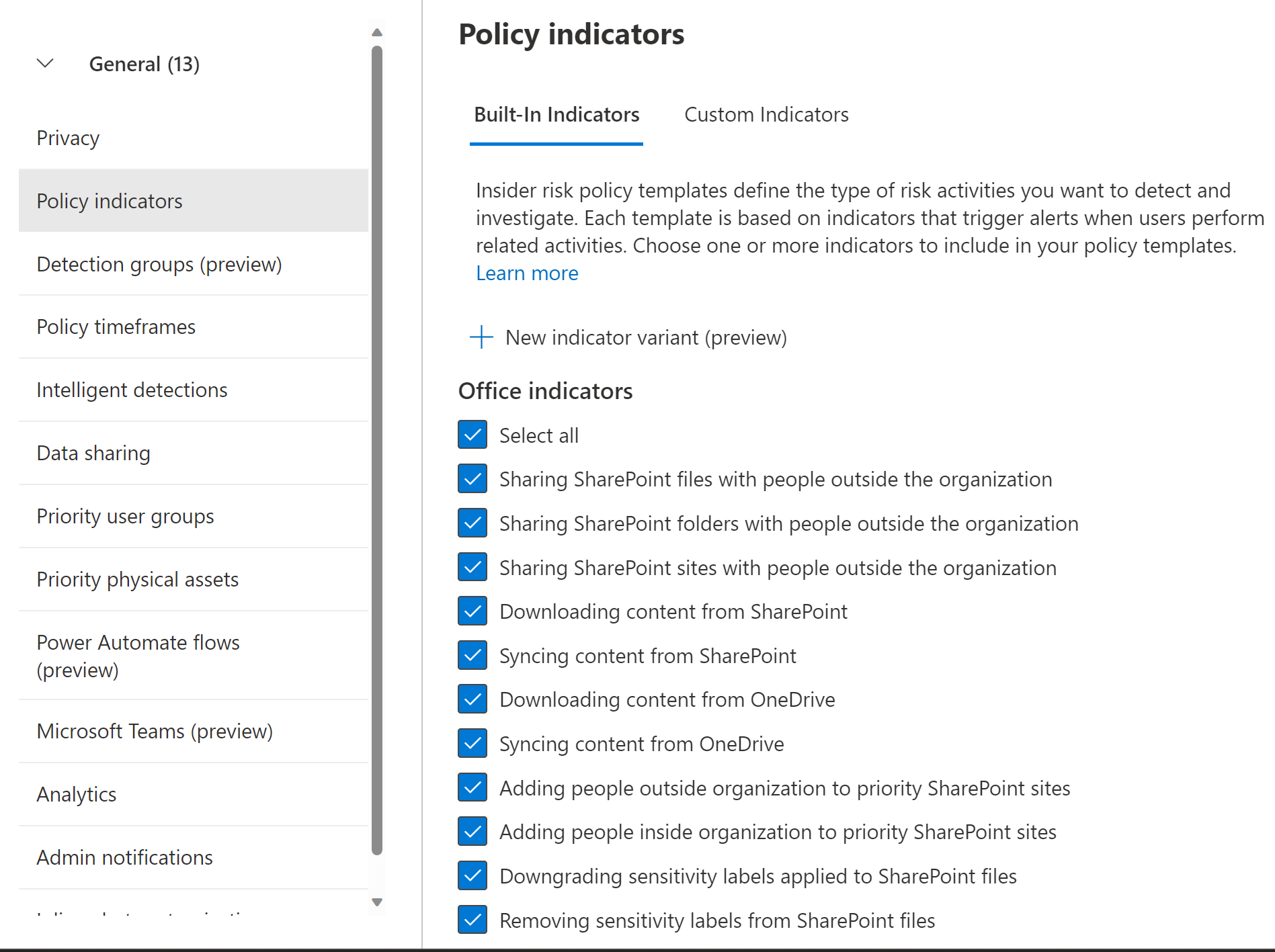
We have two different levels at which we can control indicator availability – the tenant-level ‘master list’ and per-policy indicator selection.
The ‘master list’ (found under IRM’s global settings > Policy indicators) dictates which indicators are available for any and all IRM policies. I would only look to deselect indicators from here if it is categorically undesirable to use it in any current or future IRM policy. This might be the case if I’m working for a single-country organization and that country has legislation in place preventing specific indicators from being utilized.
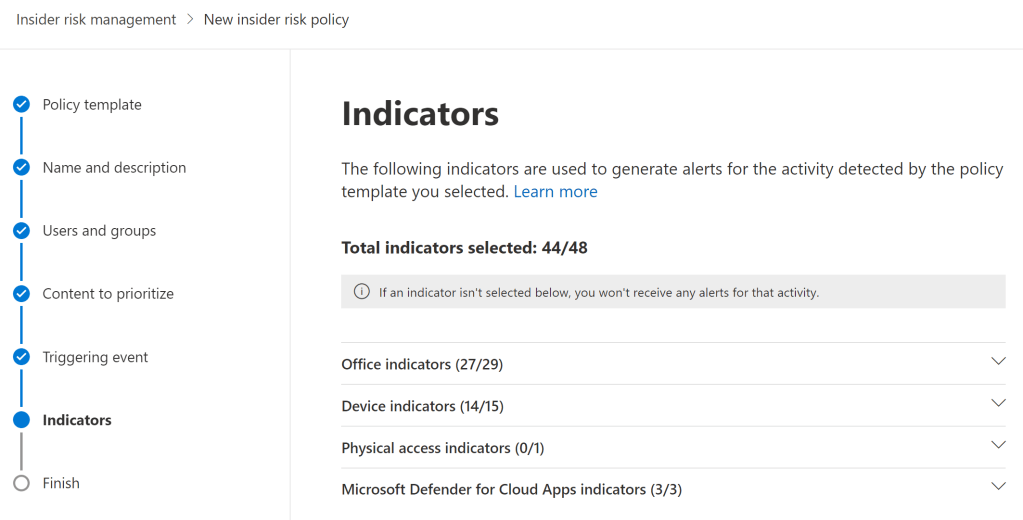
For each IRM policy you create, you can select the indicators you want to evaluate in that policy. To use this option to improve fine-tuning on the policy level, you can run a specific policy for a while to see which indicators seem over-represented or not valuable to you.
You can then either create variants of them, adjust the indicator thresholds to lower the number of triggered alerts, or even remove the base indicator from that policy entirely. An indicator I often see excluded from policies is ‘Syncing content from OneDrive’ (or SharePoint, for that matter) due to this being so mundane an activity in most cases.
Sequences can also be deselected for each policy, but I’ve yet to run into a scenario in which this would have been necessary or desirable.
If I would give one piece of advice regarding selecting indicators though, it could be this: Only exclude indicators when you clearly understand why you need to do so – don’t drop any of them based on an unsubstantiated hunch or a feeling. IRM works best when it has comprehensive signals to look at. 👍
Fine-tuning indicator thresholds

The key aspect to consider when fine-tuning IRM is the human limitations of the people actually doing the investigating.
All IRM alerts need to be triaged by humans, so it’s important to keep the volume of generated alerts manageable – even if this means losing one or two interesting alerts along the way. Remember that before you started using IRM, there was probably zero real visibility into any of these risks. Imperfect visibility is still very much preferable to that. I suggest that the risk of burning out the investigation team outweighs any benefit gained from generating too many alerts.
Let’s outline how IRM policies work:
- First, they need to be triggered by something – an employee’s resignation, a given volume of events for an indicator, a specific sequence of indicators or perhaps a DLP rule match in a specific DLP policy.
- After a policy is triggered, IRM looks N days back in time (where N is your tenant-level “Past activity detection” value of 0-90d) and scores user activity (indicators and sequences) according to a multitude of factors, including per-indicator activity volume.
- Finally, each policy has its own indicator volume thresholds determining how much of a given activity needs to occur in a day in order for a low, medium or high severity alert to be generated for human investigation.
It is this option to adjust indicator thresholds that offers us a powerful fine-tuning tool to manage alert quality and volume. Once Analytics are turned on and an IRM policy has been running for a few days, we’ll get to benefit from data-driven insights when adjusting the thresholds for each indicator.
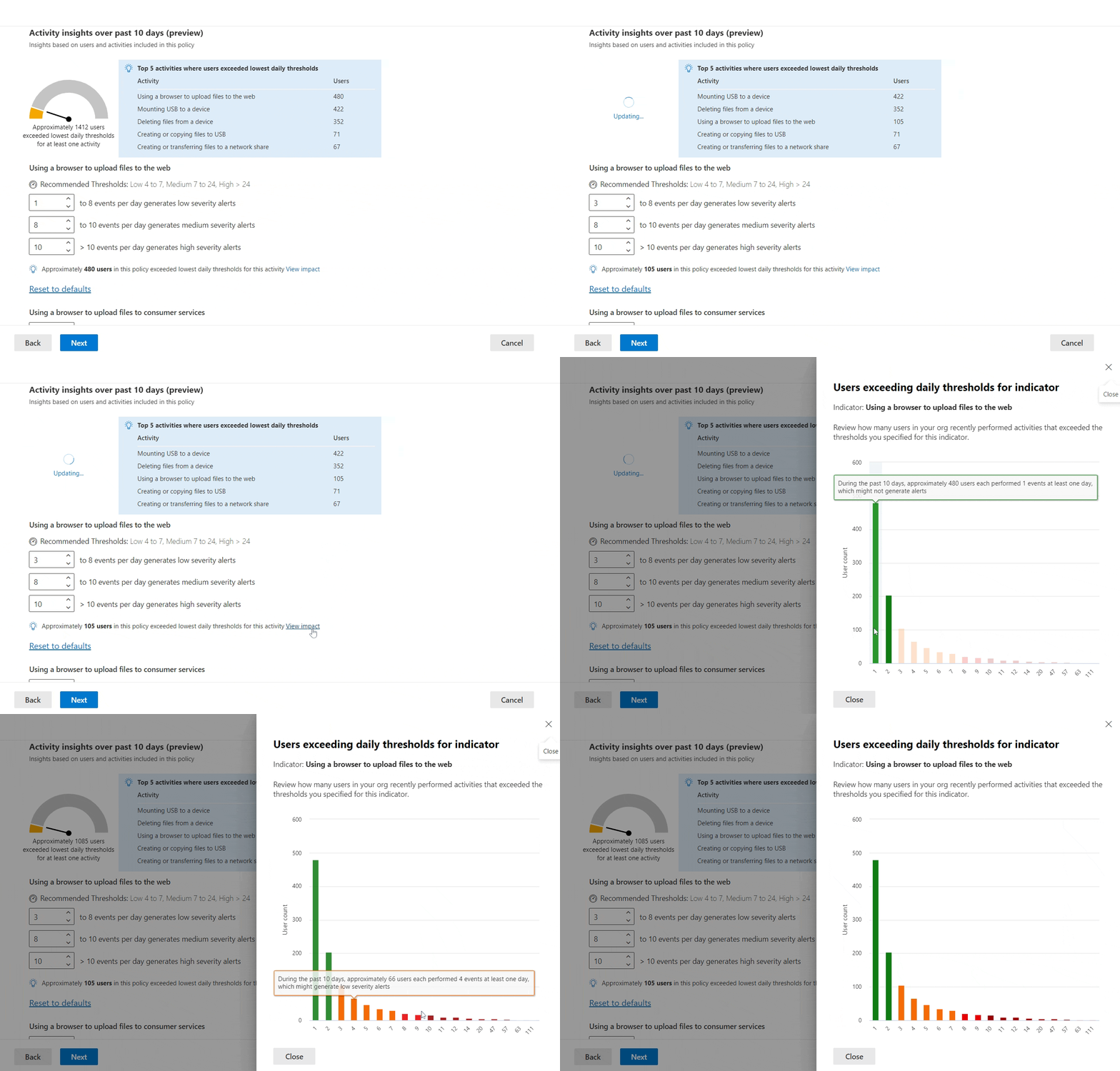
By adjusting the threshold for generating low severity alerts for each indicator, we’ll see an instantly-updated metric of how many users actually crossed that line over the last 10 days.
We can also view a more detailed graph of user activity volume for each threshold. Paying close attention to this information allows us to predict how many low, medium and high severity alerts should be generated through that indicator, based on the current policy tuning.
Just remember: events matching enabled indicators can have an effect on an alert’s overall risk score – even if their volume doesn’t exceed the threshold to generate an alert by itself.
Taking the time to adjust a policy’s indicator thresholds to only generate an amount of medium and high severity alerts your IRM team can handle is crucial in the medium to long term. Indicator threshold tuning plays a key part in accomplishing this.
Continued in part 3


6 responses to “Fine-tuning Microsoft Purview Insider Risk Management – part 2”
[…] Choosing the relevant indicators for each scenario […]
LikeLike
This is a very good series, when can we expect part 3?
LikeLike
Thank you – quite soon actually! I have been busy with some particular stuff outside of professional life that has delayed the continuation of the series as I initially planned, but I’m aiming to finalize the next part in the coming weeks.
LikeLike
[…] Choosing the relevant indicators for each scenario […]
LikeLike
Are you aware if indicators related to sensitive information (e.g. ‘Copying sensitive or priority content to the clipboard’) require DLP policies to be deployed and configured to trigger rule matches if a certain number of SIT’s are copied? Or are these events monitored independently?
LikeLike
Thanks for asking. For device indicators, it should be enough to have the device onboarded to Purview, which is most commonly ultimately handled through MDE onboarding. I’m not aware of Endpoint DLP policies targeting clipboard activity etc. being a prerequisite for IRM indicators as long as you have “Always audit file activity” tenant-level setting turned on under Endpoint DLP settings.
On the other hand, if you don’t have “Always audit…” turned on, you might need to create some eDLP policies (audit-only or otherwise) to cover scenarios you are interested in generating audit events for, which in turn feed into IRM.
LikeLike