



Microsoft’s Insider Risk Management (IRM) is a powerful tool for helping detect and mitigate various high-risk insider activities.
Initially, IRM shares at least one similarity with SecOps SIEM systems like Sentinel – it needs fine-tuning to cut down on false positives and clean up the proverbial signal. This helps human investigators spend their valuable time focusing on the right information.
Without carefully doing the necessary legwork, IRM is likely to flood your insider risk analysts with low-value alerts. Luckily, this challenge can be solved.
When I’m helping my customers get started with IRM, I tend to recommend and implement several initial tools for improving the signal-to-noise ratio. In this mini-series of articles, I will share tips and thoughts on the following fine-tuning methods:
Part 1
- The importance of accurate risk scoring
- Defining excluded, unallowed and 3rd party business domains
- Creation and use of detection groups to build indicator variants in place of or alongside built-in indicators
Part 2
- Choosing the relevant indicators for each scenario
- Regular fine-tuning passes for each policy’s indicator thresholds, based on analytics and other considerations
Part 3
- Creating policies based on priority user groups for high-value / high-risk roles & individuals
- Leveraging various risk score boosters
- Thoughtful use of priority content
- Use of cumulative exfiltration detection refined by peer groups through Entra ID enrichment & integration
- Configuring various types of global exclusions
- Undiscussed fine-tuning options
Note: There are further, more advanced steps on the journey like ingesting custom indicators from sources like Sentinel and leveraging priority physical asset groups. These tend to become relevant after use of IRM has matured a bit, the team running the insider risk function is comfortable with the established process and additional technical pre-requisites are in place.
To kick things off, let’s talk about a key concept in IRM fine-tuning:
The risk score
One of the constant challenges when working with IRM in real life is rooted in time. The fact that designated insider risk analysts and investigators can often have a (very) limited quantity of it allocated in any given work week makes effective triage of generated alerts a necessity.
In short, we only want to focus on the alerts most likely to contain actionable information. To help with this, IRM scores individual activities, chronological sequences of activities and entire alerts with a metric called risk score – a number between 0 (no risk) and 100 (maximum risk).
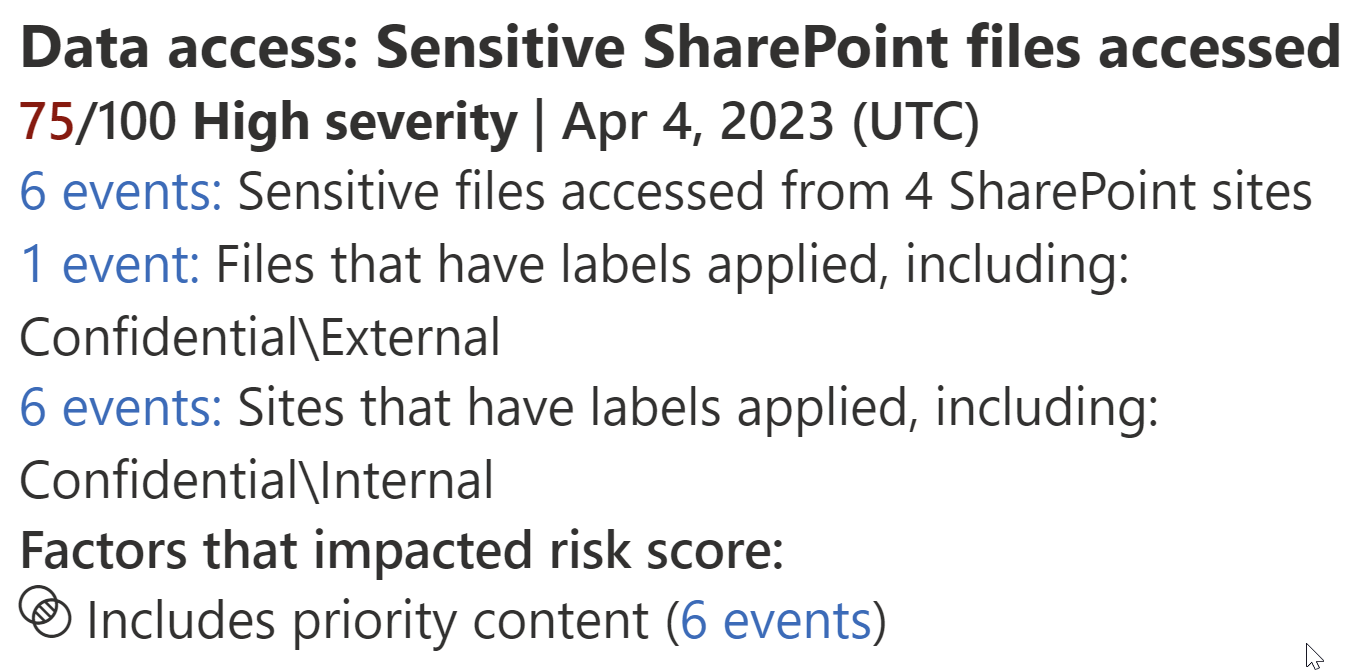
This type of score metric is only valuable when the underlying weights, score boosters and other contributing mechanisms are tuned appropriately.
For example, if 90% of an organization’s IRM alerts are assigned the maximum risk score due to poorly chosen indicator thresholds and loosely defined priority content, the insider risk team in charge of alert triage cannot effectively focus on investigating the most critical ones first.

Effective triage is especially important because the risk that sensitive data leaves the organization tends to rise constantly after an alert is triggered. In other words, IRM alerts tend to decline in value over time. This is also why unreviewed alerts are deleted automatically after 120 days.
To help ensure the risk score metric remains maximally useful for triage, we want to ensure a steady spread of risk scores with only the most damning alerts getting escalated to the full 100 points. This is where the various methods of fine-tuning come in, and why I think using many of them isn’t optional, but in fact almost mandatory for a successful operational outcome.
Let’s start with what I would do even before deploying my first policy.
Qualifying domains
Defining some allowed and unallowed domains is possibly one of the fastest initial ways to improve your IRM alert fidelity. You can find them under IRM settings > Intelligent detections.

Note – May 2024: Allowed domains are now configured under the new global exclusions settings (discussed here in Part 3) instead of under intelligent detections. The same considerations otherwise still apply, so I’ll modify the following paragraph to reflect this. Unallowed and third-party domain configurations are unaffected by this change.
Excluded domains (previously called Allowed domains) are a great place to start. Any domains added to the Domains blade under the Global Exclusions (see link above for more on those) will cause indicators involving them to be ignored. As of 5/2024, the affected indicators are:
- Sharing SharePoint files / folders / sites with people outside the organization
- Adding people outside / inside organization to priority SharePoint sites
- Granting access to sensitive or priority SharePoint resources to people outside organization
- Requesting access to sensitive or priority SharePoint resources
- Sending email with attachments to recipients outside the organization
- Adding users outside the organization to a Team / Teams private channel
- Sharing file / folder links with people outside organization in a Teams private channel
- Sharing file links with people outside organization in a Teams chat
- Using a browser to upload files to the web
- Using a browser to download content from a third-party site / from an unallowed domain
I use this setting to define any of an organization’s non-M365 service domains as “business-related” for IRM purposes, which helps cut down on false positives related to everyday normal activities. You can consider excluding any number of external services that provide personalized domains to the organization, such as contoso.servicedomain.com.
I like to start with audit log analysis based on the FileUploaded event to see which unique domains company files have been uploaded to over the last 3/7/30d, then work with the organization to identify the ones to add.
Unallowed domains have a broader effect. Any indicators involving these will simply have their risk score boosted. For starters, adding some of the most common consumer file storage, email and other services here could make for a quick win, since these are often undesirable activities in a business context.

As a bonus, you also start getting hits for a new dedicated indicator “Using a browser to download content from an unallowed domain”
Third-party domains are something I define whenever an organization relies on any authorized non-M365 service domains for storing sensitive information that is also downloadable by employees. Activity related to these domains maps to a specific device indicator “Using a browser to download content from a third-party site”

👉 A couple of tips
- All three categories of domains can be updated by filling in and uploading a CSV file. It’s by far the fastest way to add significant numbers of domains. You can export your current configuration to get a template for the file.
- Don’t forget to use wildcards. You need to manage less domain entries if you use them smartly. For example, company.sharepoint.com (SharePoint) and company-my.sharepoint.com (OneDrive) can both be covered by company*.sharepoint.com.
Indicator variants

There are certain indicators that can trigger very regularly in the course of normal business operations, potentially either contributing to unwanted false positive alerts or forcing you to tune their respective indicator thresholds to a point where they lose their value unless detected as part of a sequence.
For example, consider the following built-in indicators:
- Sharing SharePoint files with people outside the organization
- Sending email with attachments to recipients outside the organization
- Using a browser to upload files to the web
- Downloading content from SharePoint
- Creating or copying files to USB
These are all things that many information workers do every day, with each indicator likely matching significantly more benign activities than risky ones.
We can get around the issue by building something called detection groups and then using them to create our own, refined indicator variants based on built-in indicators.
Detection groups
By themselves, detection groups don’t really do anything. Think of them as components for creating your own groupings of…
- Domains
- File paths and types
- Keywords
- Sensitive information types
- SharePoint sites
- Trainable classifiers
- ..and possibly more in the future.
For example, you could build a detection group called Consumer email domains and add up to 200 domains at once.

Some easy starter scenarios for detection groups:
- Consumer domains split by service type (file storage and sharing, email, PDF editing, IM & social, …)
- Trainable classifiers related to a unifying theme – Legal, Finance, Compliance
- SharePoint sites that contain materials approved for public or external distribution
- SharePoint sites that are designated to contain highly sensitive materials
Creating a variant
With one or more detection groups in place, we can move to create some variants. Let’s take the common indicator..

Sending emails with attachments is (unfortunately) still everyday fare in business around the world. By navigating to IRM settings > Policy indicators > Built-in Indicators, we have the option New indicator variant.
Now, variants can be used in two opposite ways:
- To only detect activity when items (domains etc.) from specified detection groups are involved
- To ignore activity when specified detection groups are involved
In our example, we create an indicator that only detects instances where email with attachments matching one of 14 financial trainable classifiers is sent to known consumer email domains.
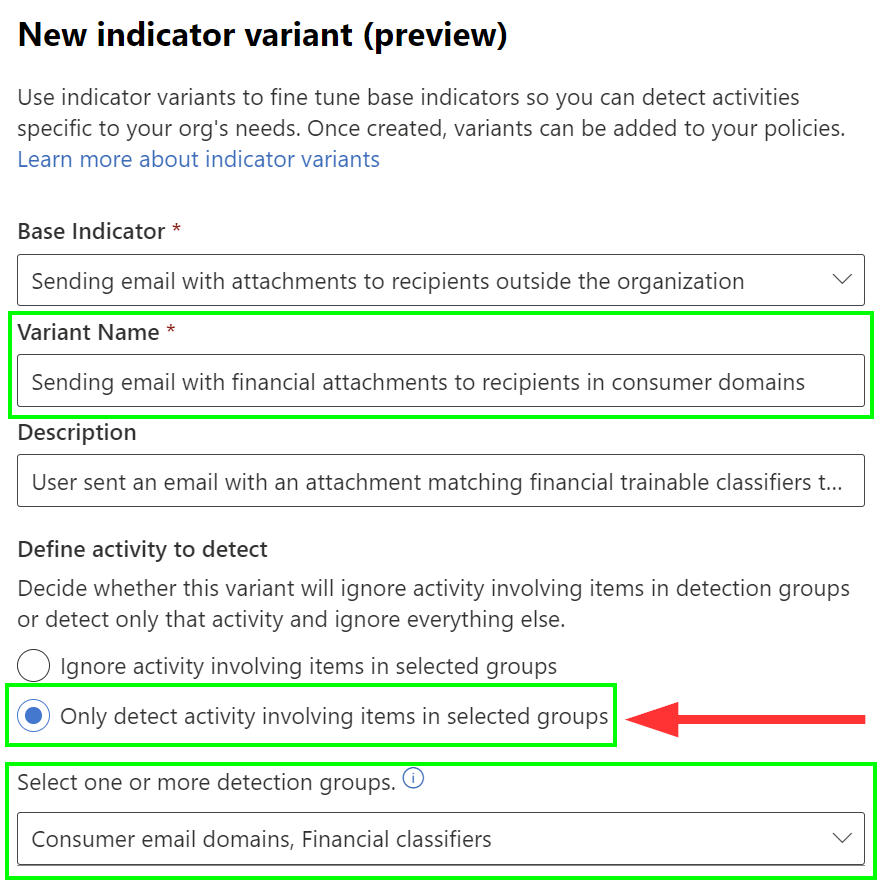
In many organizations, there are few if any viable scenarios where this scenario would happen as part of established business processes.
Once the indicator variant is created, we still need to add it to required IRM policies.
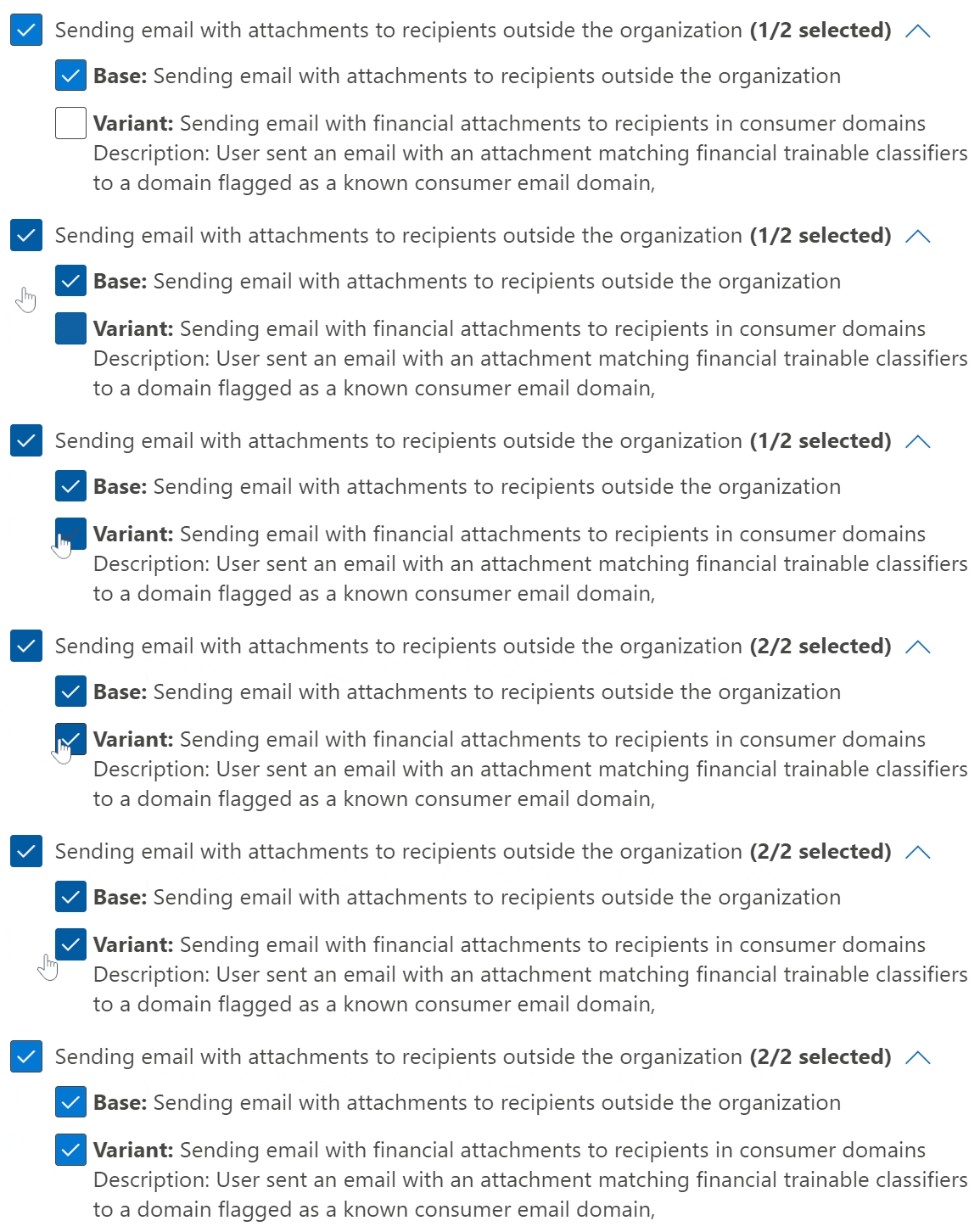
By the way, note that you can also choose to replace the base indicator with one or more variants as well. This can be very useful if you want to scope a policy to a limited user segment (say, Finance) and only look for scenarios relevant to those individuals.
⚠️ Important limitations for variants
The information below was current as of 11/2023. The most recent information on these is here and I expect things to change as we move out of Preview for this capability.
- Variants cannot be deleted just yet. This should be available once we move towards GA. (Update 1/24: Public preview for the ability to delete variants is scheduled for availability in February CY2024, as shown below. Here’s a link to the roadmap item.)

- Max. 3 variants per indicator can be created, so choose wisely – and try to not to get super granular just yet.
- Max. 5 detection groups of each specific type (domains, keywords etc.) per variant.
- Variants are only supported as standalone indicators for now – not as part of sequences or in other advanced capabilities. I expect this one to evolve over time.
All in all, indicator variants are one of the most promising fine-tuning options out there – and will be even more so once some of the current Preview limitations are lifted.
Continued in part 2
 Seppala365.cloud
11 responses to “Fine-tuning Microsoft Purview Insider Risk Management – part 1”
[…] This article is part of a series discussing my experiences fine-tuning IRM policies. To start from the beginning, check out part 1. […]
LikeLike
I noticed that it was flagging when users were uploading to our O365 Sharepoint site. I ended up adding our o365 domain to the allowed list. Is that expected behavior?
LikeLike
Yep, it’s expected if Allowed domains aren’t qualified. It’s kind of silly to be honest, but one more reason why manual fine-tuning of available controls is a must for any series IRM deployment. I hope to finally release the final part of the series soon.
LikeLike
Question – When considering allowing SharePoint sites, wouldn’t it make more sense to add it to ‘Site exclusions’ instead of ‘Allowed domains’ ? Haven’t exactly tested to see potential differences but as I just noticed the existence of both, it left me thinking.
LikeLike
Good point actually. With the recent addition of Global Exclusions, it would make more sense to use the dedicated SharePoint site exclusions there to accomplish the goal.
Just keep in mind that all activity involving excluded SPO sites will be ignored – including instances where people download content from the site, which is a typical starting point for many valuable Sequences in IRM. I would be careful when choosing which sites to exclude and not do that for any site potentially containing risky data.
LikeLike
Also thank you for this article. You’re one of the few people I’ve seen describe the impact of selections not just overview the capabilities.
LikeLiked by 1 person
Much appreciated, thanks! This kind of encouraging feedback gives me an extra boost.
LikeLike
[…] This article is part of a series discussing my experiences fine-tuning IRM policies. To start from the beginning, check out part 1. […]
LikeLike
Spot on – third party domains is currently exclusively tied to the device indicator “use a browser to download content from a third-party site”
LikeLike
Amazing work! Thanks for putting all this super valuable information in your blog, it surely will help lots of people just as it is helping me creating a IRM strategy!
LikeLiked by 1 person
I’m happy this was useful to you 💖
LikeLike